


How to Tell What Category a Credit Card Charge Coded
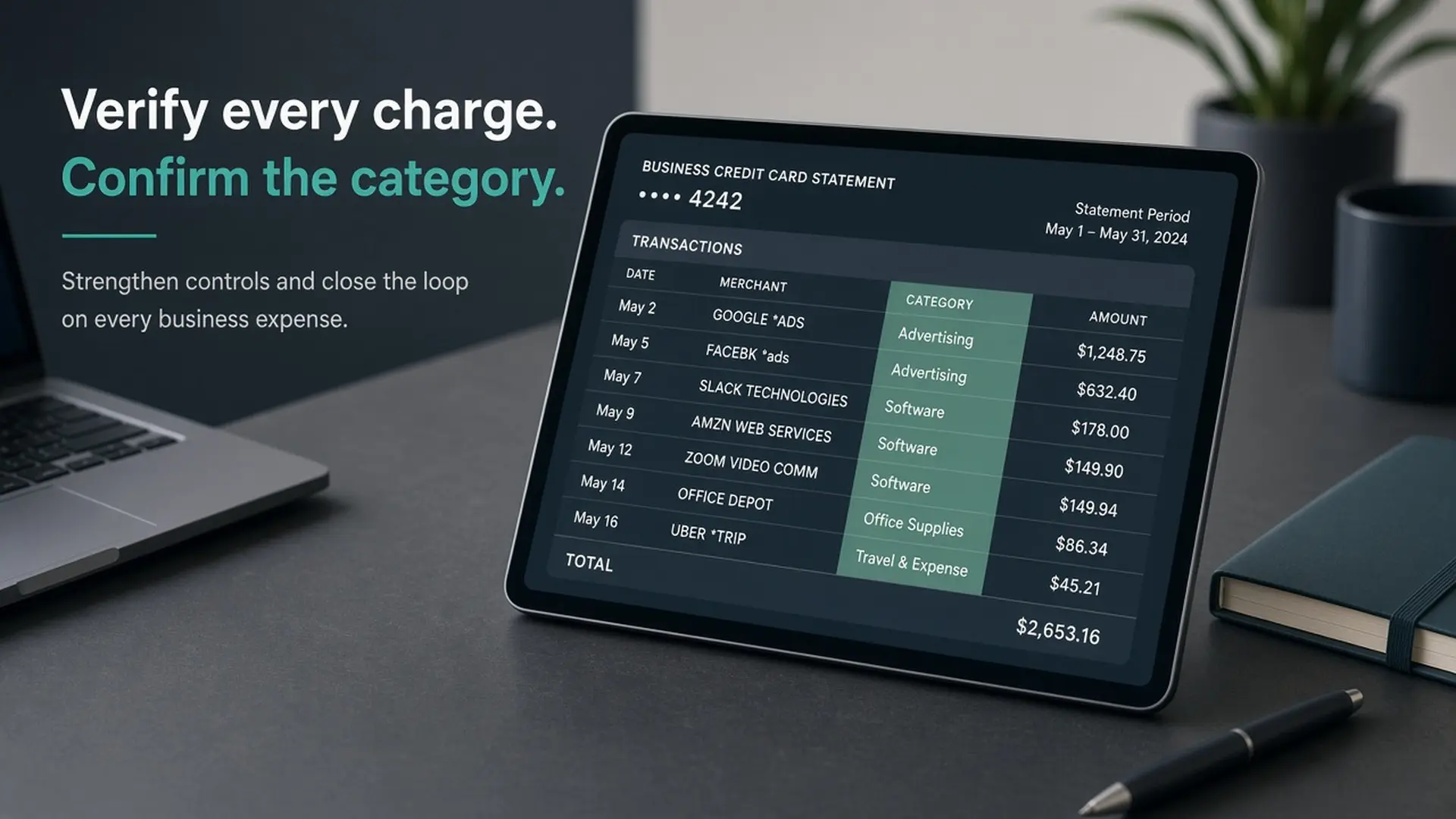
If you pay Google Ads, Meta, SaaS, or cloud bills on a business card, you eventually need to know how to tell what category a credit card charge coded — not what a blog claims the merchant “should” be. This page is the verification checklist: wait for the charge to post, read your issuer’s label, ask for the MCC when you need the number, and stop inventing codes.
“Coded as” here means two related things: the category name your issuer shows on the statement or app, and the four-digit merchant category code (MCC) the network used behind the scenes. You usually see the name first. The digits only matter when rewards, limits, or a support call require them.
Rule of thumb. Wait until the charge posts. Pending labels lie. Then check the issuer app (or PDF statement) before you call anyone.
Q: How do I tell what category a credit card charge coded as?
A: Wait until the charge posts (not pending). Open your issuer app or statement and read the category label on that transaction. If you need the underlying merchant category code, call the number on your card with the date, amount, and exact merchant descriptor and ask for the MCC and rewards category. Treat online MCC lookup tools as provisional — only your posted charge on your issuer is definitive. Do not dispute a charge just because rewards coded differently than you expected.
What “coded as” means (category label vs MCC)
On most issuer apps and PDF statements, a posted purchase shows a category name — advertising, software, office supplies, miscellaneous business services, and so on. That label is what your rewards engine and many spend controls actually use day to day. It is not always the raw four-digit MCC printed next to the line item.
MCC meaning, in plain English: a merchant category code is a four-digit classification networks use for a merchant. Your issuer maps that code into its own category vocabulary. Chase and Amex (and other issuers) do not always use the same English names for the same underlying code — so two operators can describe the same vendor differently without either being “wrong.”
Think of the MCC as the network’s filing cabinet number and the statement category as the folder label your bank pasted on top. You confirm coding by reading your folder label after the charge posts — not by guessing the cabinet number from a blog table.
Why operators care (without picking a card)
Rewards buckets and annual spend caps depend on how this charge coded on this card. If you expected an advertising bonus and the statement shows a generic services label, the multiplier (and whether you still have room under a category cap) follows the posted category — not the vendor’s marketing site.
Your books are a second system. Labeling a bill as “advertising” or “software” in QuickBooks or a GL does not force the card network to agree. Operators who conflate the two systems end up arguing with a statement that was never going to match the chart of accounts.
Fraud rules and merchant controls can also hang on category. That is another reason to verify before you scale a new vendor or open a dispute for the wrong reason. This guide is the process that supports maps like our best business cards for ad spend page.
How to tell what category a credit card charge coded (checklist)
Run this in order. It usually takes a few minutes once the charge has posted. For a consumer-side overview of find methods, see Experian’s MCC explainer — then confirm on your posted charge.
- Wait for posted. Skip pending / authorization lines. Pending category text can change or disappear when the batch settles.
- Open the issuer app or online banking. Open the transaction detail and look for category, spend category, or rewards activity on that line.
- Pull the PDF statement if the app is vague or only shows a merchant name. Some issuers surface clearer category language on the monthly PDF than in the mobile feed.
- Note the merchant descriptor exactly. Copy it character for character — examples of the shape you will see include descriptors like
GOOGLE *ADS,FACEBK *ads,AWS, or a SaaS dba name. Descriptor text is what you read back on a support call. - If you still need the number, call the number on the card. Use the script below. Ask for both the MCC and the rewards category the issuer applied.
- Optional: community / lookup tools as provisional only. AwardWallet-style merchant lookups and public MCC lists can hint at history. They are not a guarantee for your posted charge on your network and issuer.
Issuer call script (copy this):
“I need the merchant category code and the rewards category for a posted charge on [date], amount [X], descriptor [exact text].”
Checklist caption: how to tell what category a credit card charge coded — post → app → MCC call.
Why lookups and “known” codes fail
Networks are not identical — card networks publish their own merchant-category rules (for example Visa’s Merchant Data Standards Manual). The acquirer (the merchant’s processor side) assigns classification in the first place. Merchant-of-record arrangements, billing entities, and platform processors can surprise you: the vendor you “feel” you bought from is not always the legal merchant on the wire. Apple- or Google-style platform billing is the classic consumer version of that problem; operator stacks see the same pattern with agencies, resellers, and consolidated invoices.
Hybrid merchants and multi-product companies make it worse. One brand can run several merchant accounts. A tools vendor that sells both media and software seats may not post the way your mental model expects.
That is why we do not publish a “Google Ads / Meta / AWS = ####” table here. Observe the posted charge on your issuer. Later Credit Waypoint guides cover advertising and software splits with observed evidence — this page teaches verification, not invented codes.
Advertising vs software coding (card vs books)
Secondary question operators ask constantly: is advertising vs software the same on the card and in the books? No. Card coding is MCC → issuer rewards / category label. Bookkeeping is chart-of-accounts judgment (paid media vs MarTech SaaS, for example). They can agree. They often do not.
Frame it this way: the same vendor family can feel like “ads” in your P&L and still code differently on the card — or the reverse. Confirm the posted card category before you assume it matches the GL line your bookkeeper used.
Upcoming guides will dig into questions like “Does Google Ads code as advertising?” and “Software vs advertising: why the same vendor splits.” Until those land, treat every named-vendor claim you see online as provisional and re-run the checklist on your own statement.
When coding isn’t what you expected
If rewards missed after you already know how to tell what category a credit card charge coded, start here. Ask the issuer for the MCC and the rewards category, and write down the answer (date of call, agent notes, ticket number if they give one). That record is more useful than a screenshot of a third-party lookup.
Wrong rewards category ≠ unauthorized charge. Do not open a dispute just because you wanted a different bonus bucket. Disputes are for fraud, non-delivery, and similar problems — not for “I thought this would be 3x.” Misusing disputes can create worse account issues than a missed multiplier.
Before you scale a new vendor: run a small test charge, wait for it to post, confirm category and rewards activity, then scale. Five dollars of confirmation beats five thousand dollars of surprise coding.
Quick checklist
- Wait until the charge posts (ignore pending).
- Read category / rewards activity in the issuer app or PDF statement.
- Copy the merchant descriptor exactly.
- Call the number on the card for MCC + rewards category if the app is not enough.
- Treat public MCC lookups as hints only.
- Do not invent Google / Meta / AWS / SaaS codes from memory.
- Do not dispute solely for unexpected rewards coding.
- Small test → confirm → then scale new vendors.
Questions
Short answers for operators who still need how to tell what category a credit card charge coded after the checklist.
Use this when you need how to tell what category a credit card charge coded without guessing from a blog table. What does “coded as” mean on my statement?
Usually a category name your issuer derived from a merchant category code. The four-digit MCC itself may not appear on the line item even though it drove the label and rewards treatment.
Why should I wait until the charge posts?
Pending and authorization rows are temporary. Category text can change when the merchant settles the batch. Decisions based on pending labels are unreliable.
How do I ask my issuer for the MCC?
Call the number on the card. Give the posted date, amount, and exact merchant descriptor. Ask for the merchant category code and the rewards category applied to that charge.
Are online MCC lookup tools accurate for my Google Ads / SaaS bill?
They are provisional. Community history and public lists can be useful hints, but only your posted charge on your issuer and network is definitive — especially when merchant-of-record or processor billing is involved.
If my rewards didn’t match, should I dispute the charge?
No — not for coding alone. Ask for clarification on MCC and rewards category. Reserve disputes for unauthorized or problematic purchases, not bonus disappointment.
Is card coding the same as how my bookkeeper labels advertising vs software?
No. Bookkeeping labels and card coding are different systems. Confirm how the charge coded on the card before you assume it matches your GL category.
What does MCC mean?
A merchant category code (MCC) is a four-digit classification networks use for a merchant. Your statement usually shows a category name your issuer derived from that code, not the digits themselves.
What to read next
Use this verification process alongside the operator ad-spend map — the map only helps if you confirm how each bill actually coded. For how Credit Waypoint builds comparisons, see how we compare. Independence and relationship notes live on our disclosure.
Confirm on your statement. Issuer terms beat every guide — including this one.